![keydata-logo-fullcolor-4.png]](https://support.keydatadashboard.com/hs-fs/hubfs/keydata-logo-fullcolor-4.png?height=50&name=keydata-logo-fullcolor-4.png)
You can now exclude out-of-service units from your dashboard data using the new "Hide Inactive" filter. No more manually adjusting reports one by one — toggle it on at the section level and every report in that section updates to reflect only your active portfolio.
Where to find it
Dashboard or report → open Filters → Filters tab → check "Hide Inactive" → Apply
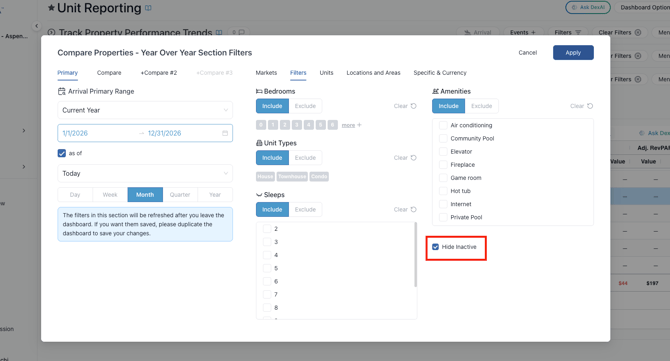
The filter is available in section-level filters and report-level (bottom right corner on an individual report) filters across ProData, Snap, Snap+, MID, DMO, and Enterprise products. When active for a Section, a filter pill appears in the section header so you always know what's driving your data.
Why it matters
- Accurate performance metrics. ADR, RevPAR, occupancy, and revenue calculations reflect only the units you currently manage — not ones you've offboarded.
- Consistent data across sections. Every report in a section respects the same filter, eliminating mismatches between reports.
- Works across data sources. The filter applies to both your PM data and the Direct (market) data line, so benchmarking comparisons stay apples-to-apples.
- Shared links preserve your view. When you share a dashboard link, the recipient sees the same filtered view you intended.
Supported data sources
The filter works with PM and Direct (market) data sources. When toggled on in a combined benchmarking report, both your PM line and the market line exclude inactive units — keeping comparisons consistent. OTA and Hotel data sources are not supported by this filter at this time.
Good to know
- A unit is considered inactive when its Out of Service date is today or in the past.
- ProData users: If you need to update your unit inventory Out of Service dates, go to your left-side menu Unit Settings.
- Inventory KPIs like Units Lost, Churn Rate, Growth Rate, and Net New Units are intentionally unaffected by this filter — they need the full historical unit set to produce accurate results. This is by design, not a bug.
- Total Units is the one inventory KPI that does respect the filter, showing only active units when "Hide Inactive" is toggled on.
- The filter defaults to off and your selection is saved for custom dashboards and saved reports.