![keydata-logo-fullcolor-4.png]](https://support.keydatadashboard.com/hs-fs/hubfs/keydata-logo-fullcolor-4.png?height=50&name=keydata-logo-fullcolor-4.png)
🧠 DexAI Got Smarter
We've invested heavily in giving DexAI a deeper, overall understanding of the Key Data platform, your reports, and the metrics that matter to you.
- DexAI now understands your reports and KPIs. Ask it "What is ADR?" or "What does the Pacing Detail report show?" and it'll give you a clear, plain-language explanation, free of analyst jargon.
- Better answers, fewer misses: We've expanded the knowledge DexAI draws from, including report descriptions, KPI definitions, and real-world Q&A from our team's customer conversations. When you ask a question, DexAI has much more context to work with.
- Smarter report recommendations: When DexAI suggests a report, it's pulling from your actual Reports catalog, instead of guessing. This means more relevant suggestions.
- Clearer communication: We've tuned DexAI to talk like a helpful colleague, instead of a data dictionary. Responses are more concise, more actionable, and better tailored to property managers.
💬 Report Insights V2— Now a Conversation
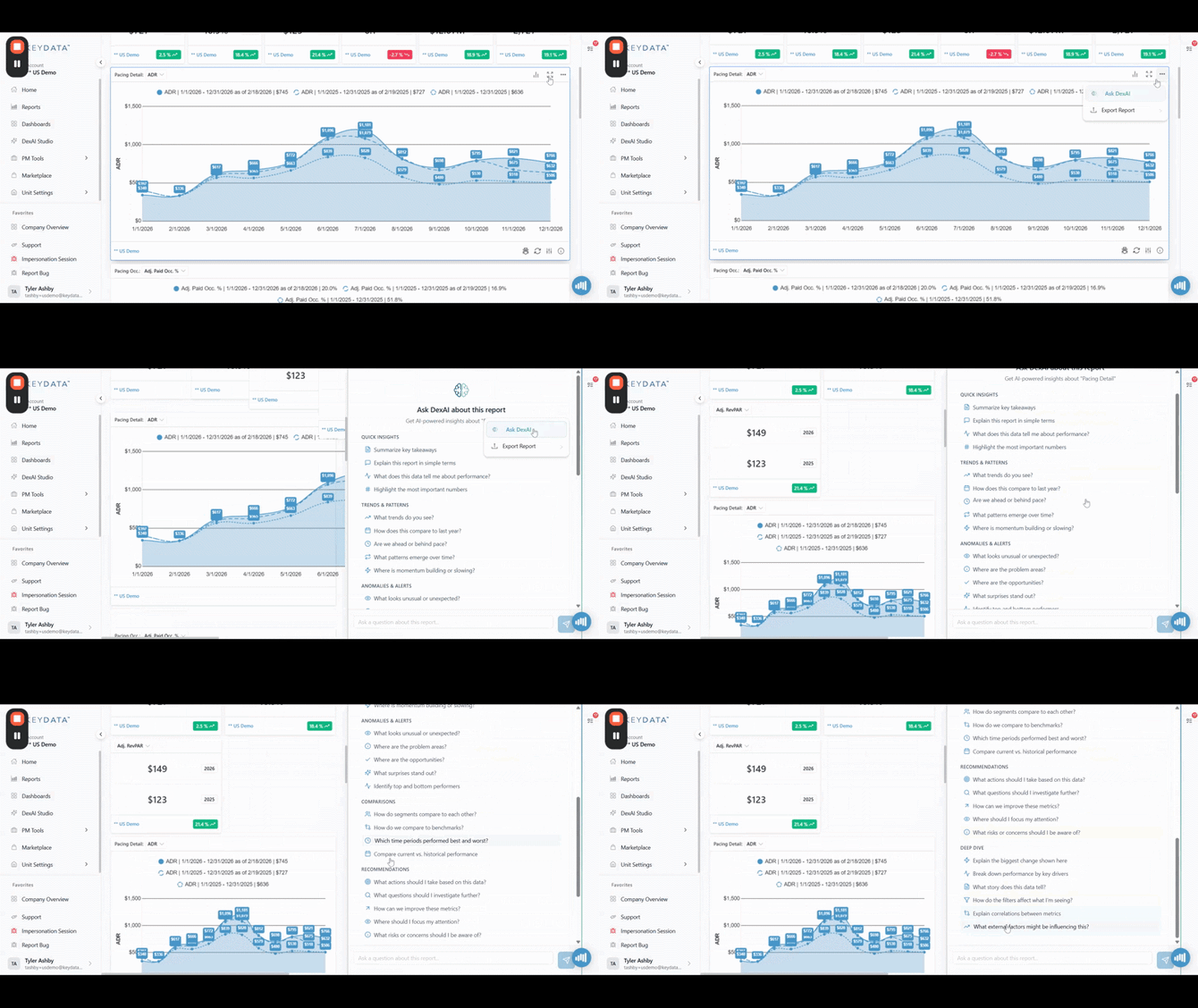
Previously, when you asked DexAI to analyze a single chart or table report, you'd get one big response, and that was all. Report Insights is now fully conversational.
- Ask follow-up questions: After DexAI analyzes your report, you can dig deeper (ex. "Why did ADR drop in March?" → "Which markets were most affected?") without starting over.
- Suggested follow-ups: DexAI now suggests smart follow-up questions after each response, so you always have a next step. Just click a suggestion to keep going.
- On-demand details: DexAI no longer dumps everything at once. It gives you a focused answer first, and you can ask for action items, filter suggestions, or related report recommendations when you're ready.
- Visual summaries: Dex can generate visual summary cards right in the conversation when you need a quick glance.
📊 Dashboard Analyzer V2 — More Precise, More Conversational
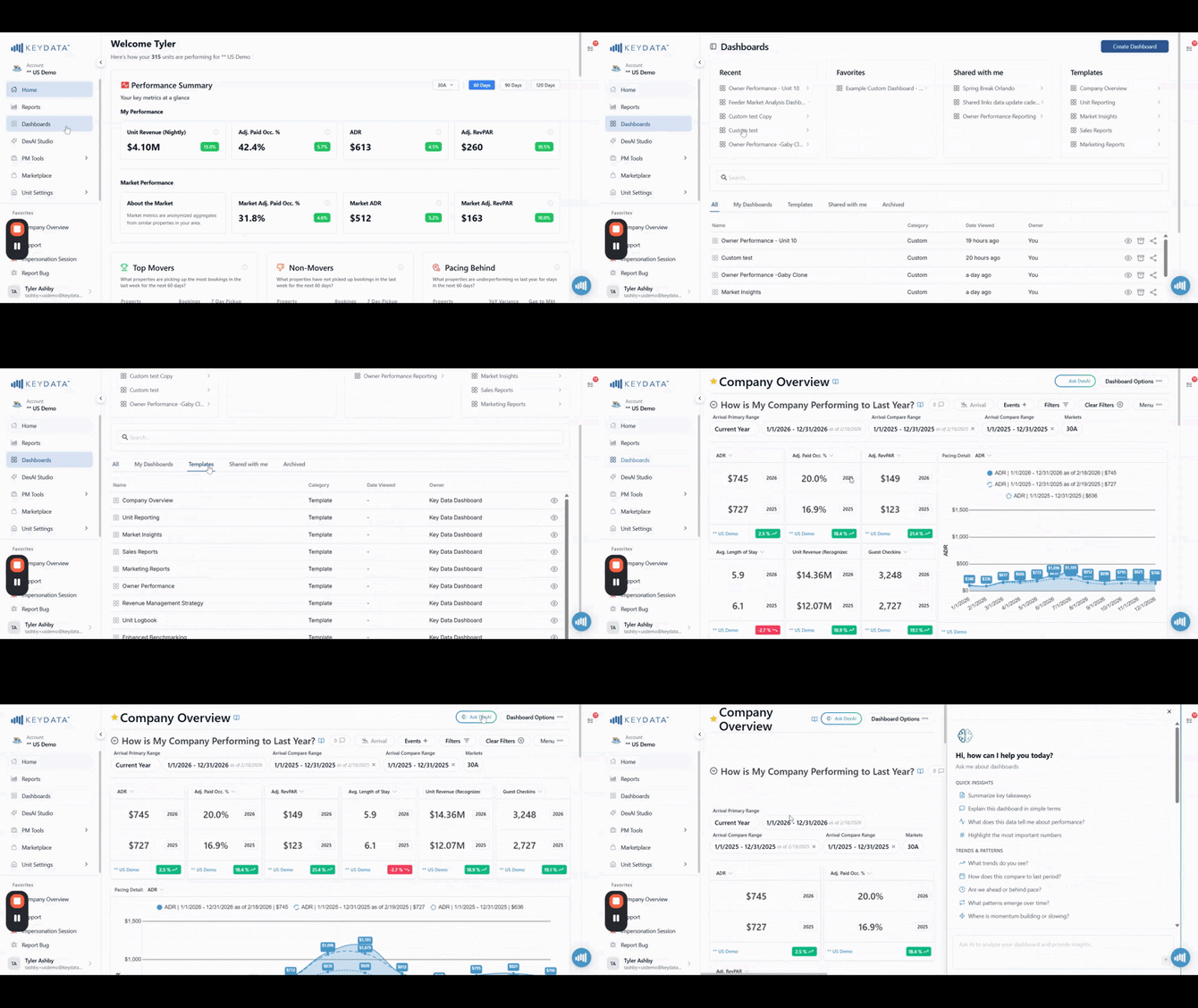
The dashboard analyzer has been rebuilt from the ground up for better, more targeted feedback. Navigate to any dashboard in your portal and "Ask DexAI" to analyze it.
- Guided conversations, not data dumps: When you ask DexAI to analyze your dashboard, it'll ask clarifying questions instead of trying to analyze everything at once. This means more relevant insights for what you actually care about.
- Section-level precision: The analyzer now understands your dashboard's structure in terms of different sections, reports, and how they relate. Ask to target specific sections for deeper analysis.
- Follow-up questions and action items: Just like Report Insights V2, you can now have a back-and-forth conversation about your dashboard. DexAI suggests follow-up questions and creates structured action items you can act on.
- Smarter about broad requests: If you ask to "analyze everything," DexAI will suggest narrowing your focus first to give you higher-quality insights. You can still go broad, but you'll get better results when you're specific.
🏗️ DexAI Studio V2 — Build Dashboards with AI
This is a big one! We're introducing a completely new way to create dashboards — just tell DexAI what you want.
- Natural language dashboard creation: Go to DexAI Studio → Generate Dashboard, then describe what you want (ex. "I need a YoY pacing dashboard for my Miami properties with ADR, RevPAR, and Unit Revenue") and DexAI builds it for you.
- Live preview before you save: See a summary of what your dashboard will look like in a side-by-side view with chat on the right, and a dashboard preview on the left. Tweak your request and preview again before saving to your custom dashboards.
- Smart report matching: DexAI matches your request to the right reports from your catalog using intelligent search and won't suggest reports you don't have access to.
- Understands your filters: Tell DexAI "year over year, Miami Beach, 2-5 bedrooms" and it'll help you set up the right date ranges, markets, and property filters automatically.
Your Feedback Matters
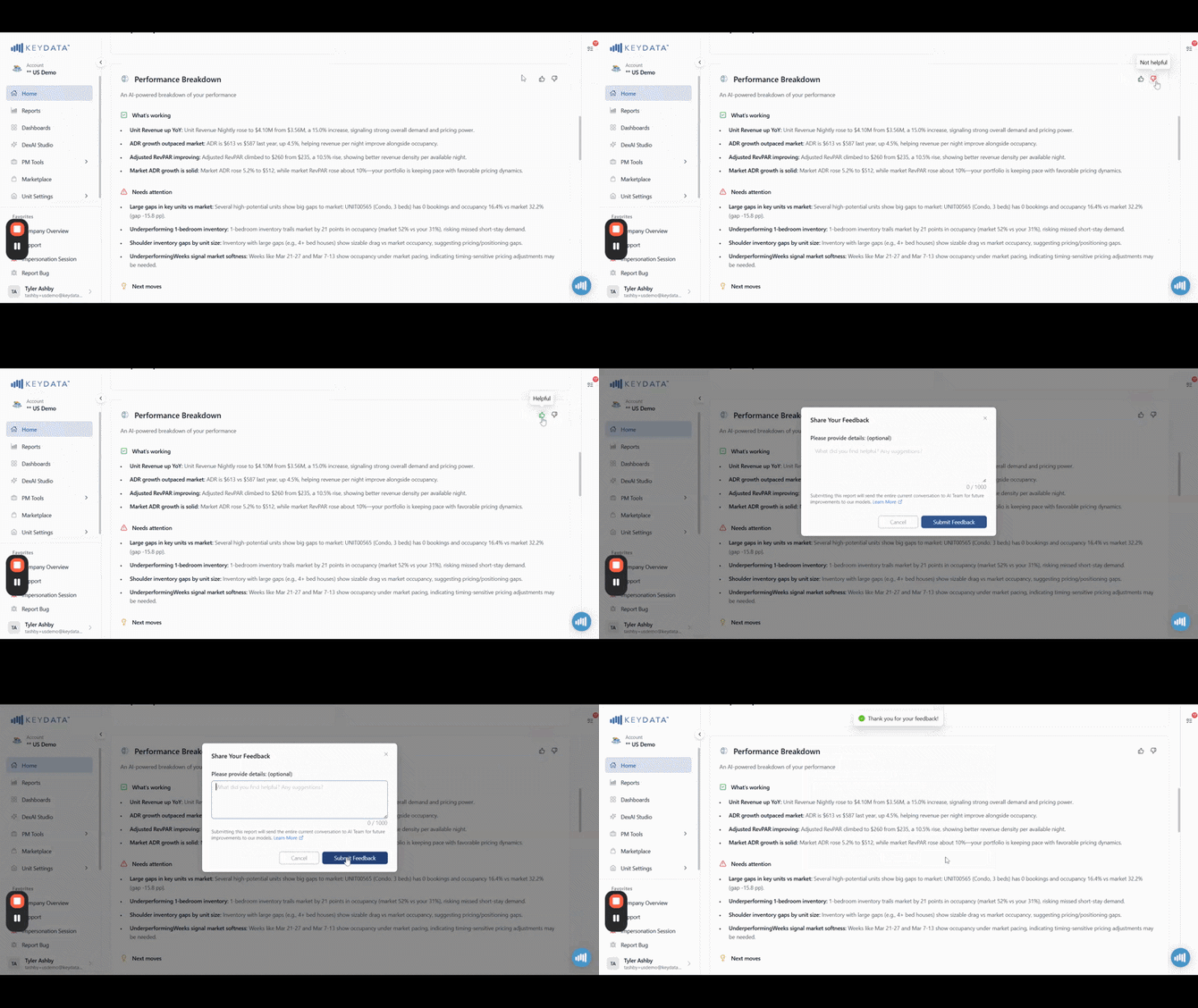
Every conversation you have helps us make DexAI smarter. Please keep sharing what works and what doesn't by clicking Thumbs Up👍or Thumbs Down👎when you see the icons in your chat.
What's Next for DexAI?
These Dex AI beta features will be available to all ProData Dashboard accounts in March 2026, and we'll continue to improve DexAI across the board.
More DexAI Studio tools are in the works, such as chat, report generation, and more. Stay tuned!